Blown away by @andremichelle's openDAW, which runs ENTIRELY in the browser! 🤯
So much thought and attention to detail went into this. And it's all Open Source too!
https://github.com/andremichelle/openDAW
The web is AMAZING 🤩
Public posts from @bramus@front-end.social
Blown away by @andremichelle's openDAW, which runs ENTIRELY in the browser! 🤯
So much thought and attention to detail went into this. And it's all Open Source too!
https://github.com/andremichelle/openDAW
The web is AMAZING 🤩
RE: https://mastodon.social/@btconf/116452257783154891
I’ll be at Beyond Tellerrand next week to tick all 4 boxes but I need your help with number 3 … see you there?
Built something cool with HTML-in-canvas?
Go add it to https://github.com/GoogleChromeLabs/css-web-ui-demos/blob/main/html-in-canvas/awesome-html-in-canvas.md, which gathers all demos in one place.
(Only add the stuff **you** built though, not stuff by other folks)
Get the details on @scope here: https://developer.chrome.com/docs/css-ui/at-scope.
Over the past years, I’ve written a bunch of posts and done quite a few experiments with View Transitions, such as optimizing the keyframes (so that they animate on the compositor) or driving a VT by scroll.
I noticed I repeated a lot of code while creating all those … so I bundled that all up in a package for you to use as well.
Optimizing the keyframes or a VT for example now is just a one-liner: optimize(transition);
If you’ve ever tried to build a data table with a sticky header and a sticky first column, you know the pain: the reality was that only one of both would stick.
A recent change to CSS fixes this: `position: sticky` now plays nice with _single-axis scrollers_.
“More” I say?
Yes, I did an experiment with making an extension to debug Anchor Positioning before:
https://front-end.social/@bramus/116213083230487150
There's a lot of complexity involved to make it work accurately … so that one ain't public (yet?).
Some more prototyping fun: this time an extension to visualize the Containing Block of an element.
It shows the element and its containing block (an element, the Viewport, or the ICB) along with some base info.
Get it here: https://chromewebstore.google.com/detail/devtools-containing-block/cfhjohibdfclahlfljknkjmcdkfkcflj
What other info would you like to see in a feature like this?
(The heavy lifting to identify the containing block is done by the https://github.com/bramus/get-containing-block package which I also created for this)
RE: https://front-end.social/@leaverou/116297807826814028
Before you blindly say 100px–200px–300px, hear me out: https://github.com/LeaVerou/blog/discussions/137#discussioncomment-16340589
(And if you really want it to be 100px–200px–300px then it’s simple: don’t type the --arg)
RE: https://mastodon.scot/@svgeesus/116280100248182454
More details on the “parsing would be hard” part in https://www.bram.us/2026/03/19/more-easy-light-dark-mode-switching-light-dark-is-about-to-support-images/ ;)
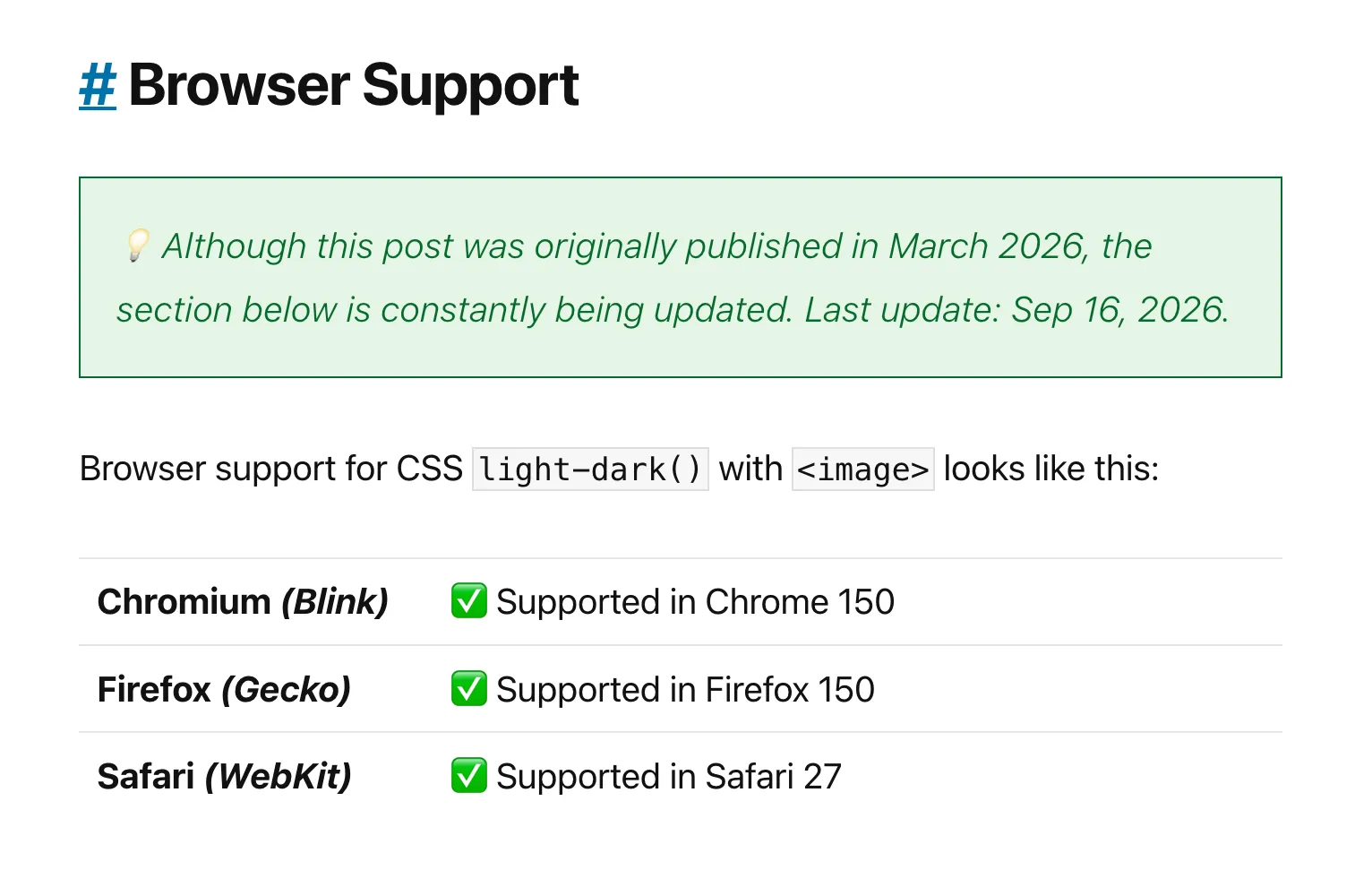
CSS `light-dark()` is about to support images!
Shipping in Firefox 150. Starting tomorrow, available behind a flag in Chromium 148.
New in Chromium 148: detect at-rule support in CSS with `@supports at-rule(@keyword)`
https://www.bram.us/2026/03/15/at-rule/
Chrome 148 is currently available on the Canary and Dev release channels. It goes stable at the end of April.
RE: https://mastodon.world/@heypresents/116222571128090421
“Curiosity breeds Discovery”
I spend a fair bit of time playing with View Transitions, and bending it in all sorts of ways.
This talk compiles my insights from building some of the more wild things with VTs.
See you at All Day Hey!?
(Expect a lot of code getting thrown your way!)
Other takeaways are:
- Damn, that was fast!
- We need a way in DevTools/the web to be notified of style changes (hello, brm.us/style-observer!)
- We need a Element.getAnchor() JS method.
- The "remembered scroll offsets" are a PITA.
So. Anchor Positioning and DevTools …
I sat together with The Hype™ tonight and this is what we built in 2 hours.
Main takeaway from this experiment is that it still requires a “Subject Matter Expert” (in this case: me) to build this, instructing The Hype™ what to do (and sometimes how to do it).
Introducing `view-transitions-mock`: A non-visual Polyfill for Same-Document View Transitions
It is a spec-compliant JavaScript implementation of Same-Document View Transitions that polyfills the entire JavaScript API surface but that doesn’t do the animation bits.
Help me out:
I’m looking for examples / use-cases where you want to trigger an action _after_ a programmatic scroll(*) finished.
No need for an actual demo; a description of the use-case itself is good enough.
(*) Things such as `Element.scrollIntoView()` or `window.scrollTo()`.
On my way back home from #SotB2026 I hacked my way into animating between `position-area` values with View Transitions. The VT automatically gets started by a StyleObserver.
Demo + details can be found on my blog: https://brm.us/animate-position-area
It’s not 100% perfect though, as Firefox doesn’t do anything and Chrome has a 1-frame glitch.
RE: https://mastodon.world/@webstandards/116147775062588951
You can find the slides of my #SotB2026 talk on my blog: https://www.bram.us/2026/02/28/anchors-aweigh-sotb2026/
You can install `view-transitions-mock` through NPM. The library is fully tested, in both browsers with and without native View Transitions support.
All info in the repo: https://github.com/GoogleChromeLabs/view-transitions-mock
With the mock registered, you can write modern standard-compliant Same-Document View Transitions code for _any_ browser, including those without support for document.startViewTransition or VT Types.
Safely call the API, handle its promises, and manage VT Types as if they were natively supported! 🥳