
🏆 Red Dot Best of the Best
🏆 iF Gold
🏆 IDEA Gold
iA Notebook completes the product design Grand Slam!
🏆 Red Dot Best of the Best
🏆 iF Gold
🏆 IDEA Gold
iA Notebook completes the product design Grand Slam!
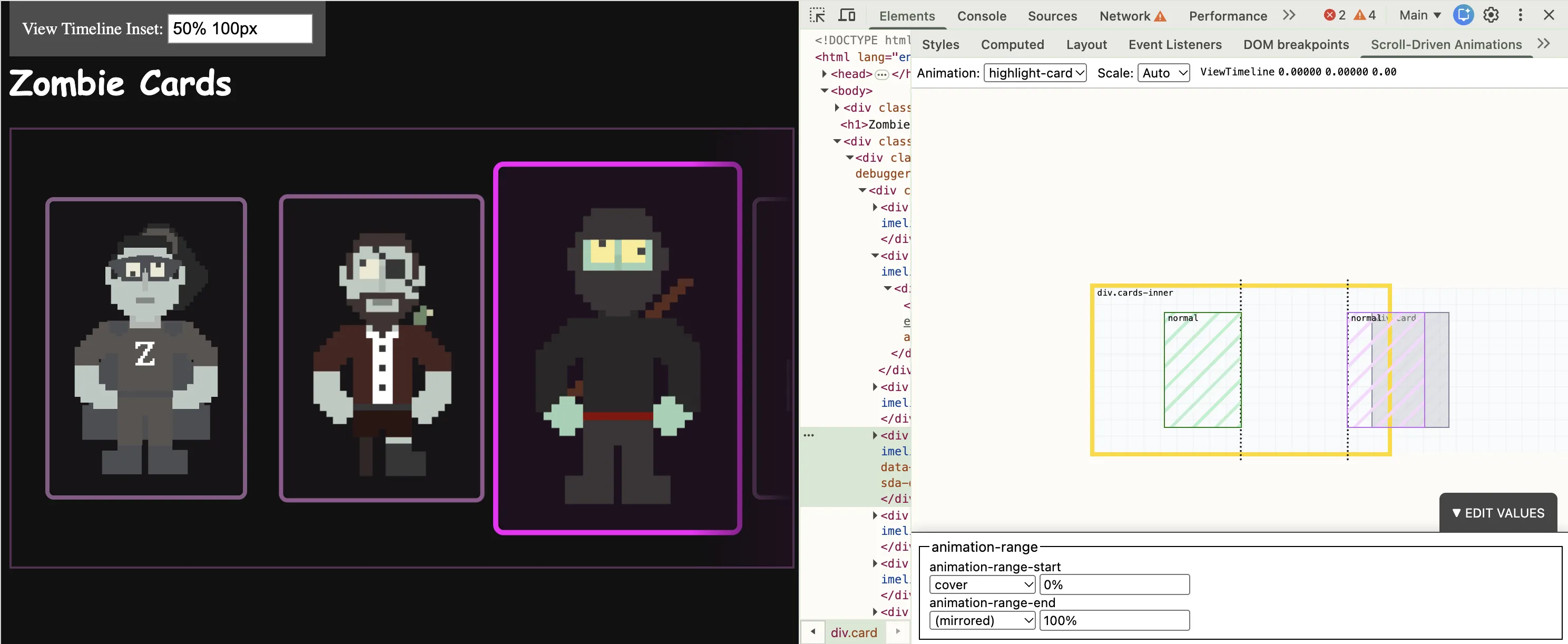
Productive evening. Added 1 new features + fixed 4 bugs for my Scroll-Driven Animations DevTools extension (http://brm.us/sda-debugger)
- Scrollable Minimap
- Play nice with Pseudo Elements
- Support more units in the ranges
- Support min(), max(), … in the ranges
- Take `view-timeline-inset` into account (+ visualize)
Release imminent.
Here’s a more high-fidelity demo.

Original Content – Bram.us
• Bramus!
At CSS Day (back in June), someone asked me how Brave (the browser) might have built their New Tab Page which features some tiles laid out in a grid. While the grid is nothing spectacular, something special happens with it when you resize the viewport: as the available space changes, the grid nicely reorganizes itself in an animated way. The animations are also interruptible, so no View Transitions seem to be at play.
So, how did they do it? I’m not sure. But if I were to recreate it, I’d use CSS Anchor Positioning with regular CSS Transitions on top.
Bram.us
• Bramus!
At CSS Day (back in June), someone asked me how Brave (the browser) might have built their New Tab Page which features some tiles laid out in a grid. While the grid is nothing spectacular, something special happens with it when you resize the viewport: as the available space changes, the grid nicely reorganizes itself in an animated way. The animations are also interruptible, so no View Transitions seem to be at play.
So, how did they do it? I’m not sure. But if I were to recreate it, I’d use CSS Anchor Positioning with regular CSS Transitions on top.
Back in June I shared a demo of a grid that smoothly animates on resize without JS or View Transitions.
I finally sat down to write up how it works: CSS Anchor Positioning + scoped anchors + regular CSS transitions.

iA
• iA Inc
After RedDot Best of Best and iF Gold, the IDSA gives iA Notebook its third top international design award.
Over the years I have brought some really weird things through airport security. I’ve set off the alarms once - they closed down the lane and started shouting in panic because it looked really serious on the scanners.
But never a vintage oscilloscope. Until today. Freiburg, here we come!
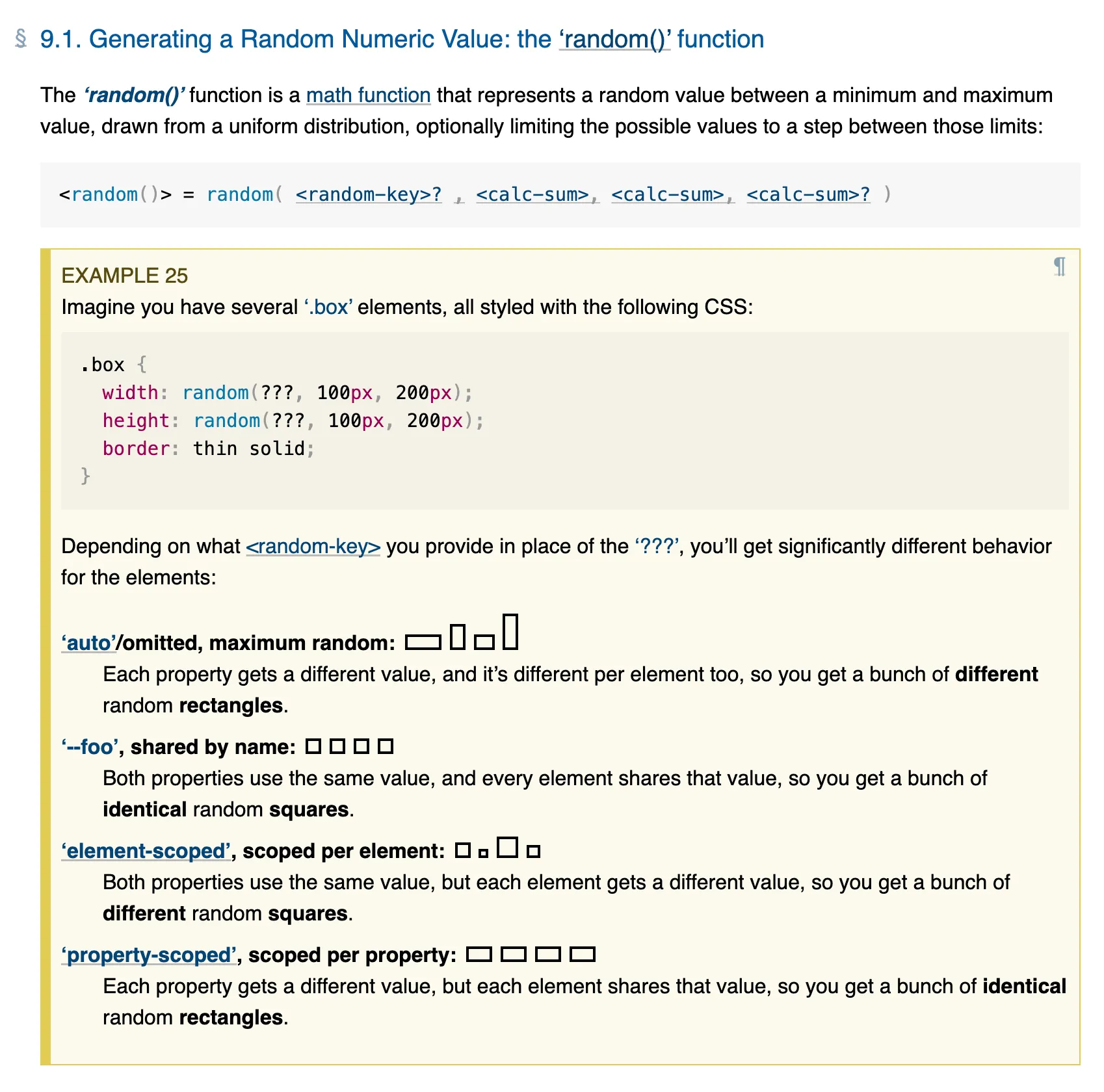
Also, if you read about `random()` before, go re-read things because the keywords changed after I brought them up for re-discussion at the WG (w3c/csswg-drafts#13132)
Awaiting an MDN update, the correct keywords and descriptions can be found in the spec: https://drafts.csswg.org/css-values-5/#random
The 3 LGTMs are in ... CSS random() officially coming to Chrome 155 (due early October)! 🎉
https://groups.google.com/a/chromium.org/g/blink-dev/c/ERWNExcOwcg/m/f3PCkiGoDwAJ
"Oscilloscopes & Other Bad Ideas"
I've been so swamped in work that I completely forgot that I am going to give a talk at the @smashingconf Jam Session next Monday. But with a title like that I already know it's going to be good.
https://smashingconf.com/freiburg-2026/jam-session
Now... is there any way I can bring an actual vintage oscilloscope with me on the plane to Freiburg? 🤔
Way back in 2005, I first used PageFlip as a Flash component to display pages of images on a website. Ever since, recreating a modern version has been on my backlog to investigate.
With the arrival of HTML-in-Canvas (experimental), we can finally bring it back — this time displaying real HTML.
Original Content – Bram.us
• Bramus!
Way back in 2005, I first used PageFlip as a Flash component to display pages of images on a website. Ever since, recreating a modern version has been on my backlog to investigate. With the arrival of the experimental HTML-in-Canvas API, we can finally bring it back — this time displaying real HTML.
Bram.us
• Bramus!
Way back in 2005, I first used PageFlip as a Flash component to display pages of images on a website. Ever since, recreating a modern version has been on my backlog to investigate. With the arrival of the experimental HTML-in-Canvas API, we can finally bring it back — this time displaying real HTML.

📚 Students and teachers: iA Writer and iA Presenter are designed to help you:
• Get focused and write papers, while keeping track of AI tools
• Effortlessly turn text into beautiful slides
Reach out to learn more about educational offers for 2026.
📧 support+edu@ia.net
Bram.us
• Bramus!
In CSS you can feature detect support for things like selectors, properties + values, and at-rules using @supports. But how do you feature detect a change to an underlying implementation, or two existing properties suddenly working together? Enter @supports named-feature(), a function designed to expose these specific capabilities without relying on hacky workarounds.
Original Content – Bram.us
• Bramus!
In CSS you can feature detect support for things like selectors, properties + values, and at-rules using @supports. But how do you feature detect a change to an underlying implementation, or two existing properties suddenly working together? Enter @supports named-feature(), a function designed to expose these specific capabilities without relying on hacky workarounds.
In CSS you can feature detect support for selectors, properties + values, and at-rules using `@supports`.
But how do you feature detect a change to an underlying implementation, or two existing properties suddenly working together?
Enter `named-feature()` for use with `@supports`. It’s a function designed to expose these specific capabilities without relying on hacky workarounds.
Help me out: I’m looking for some examples of full-page skeleton screens and loading states that are out there.
Care to share your favorite examples with me?
(There are a lot of examples that have skeleton screens on a component level, but I’m having trouble finding proper full-page ones)
Original Content – Bram.us
• Bramus!
To target multiple classes that share the same prefix, you'd typically have to resort to brittle attribute selectors or add extra base classes to your markup. To make things easier, CSS is getting a new selector: The Class Prefix Selector (.prefix-*).