
Sign up

Niels Leenheer Valid
Text

The core is just CSS – which acts as a state machine. Inputs set classes and custom properties. The output is just sampled computed styles from the DOM. Animations are defined in CSS. Buttons are setting classes with values or animations. The laser is tracing SVG elements.

I love the web.
Niels Leenheer Valid
Text

This is one of the projects I've been obsessed with for the last year or so and it brings so much together. From heart rate monitors and Joy-Con gyroscopes to lasers and even flamethrowers.

BTW, the music is Dream Life by Ren & The Skinner Brothers – from my favourite album of last year.

Niels Leenheer Valid
Video

Putting the final touches on audio input for the DMX/Laser controller project. It analyses the audio and sets a class every time it detects a beat. That allows animations to start, or lights to change colour or the laser to draw patterns.

Crazy that all of this is build using web technology.

Niels Leenheer Valid
Text

Great! My clock now randomly thinks it is a VCR. And nobody knows how to set the time on a VCR so it just blinks 12:00.

Also it sometimes it forgets to reset after midnight so it goes from 23:59 to 24:00 to 25:00 and on.

And yes. I am using a round display for a square digital clock…

Niels Leenheer Valid
Text

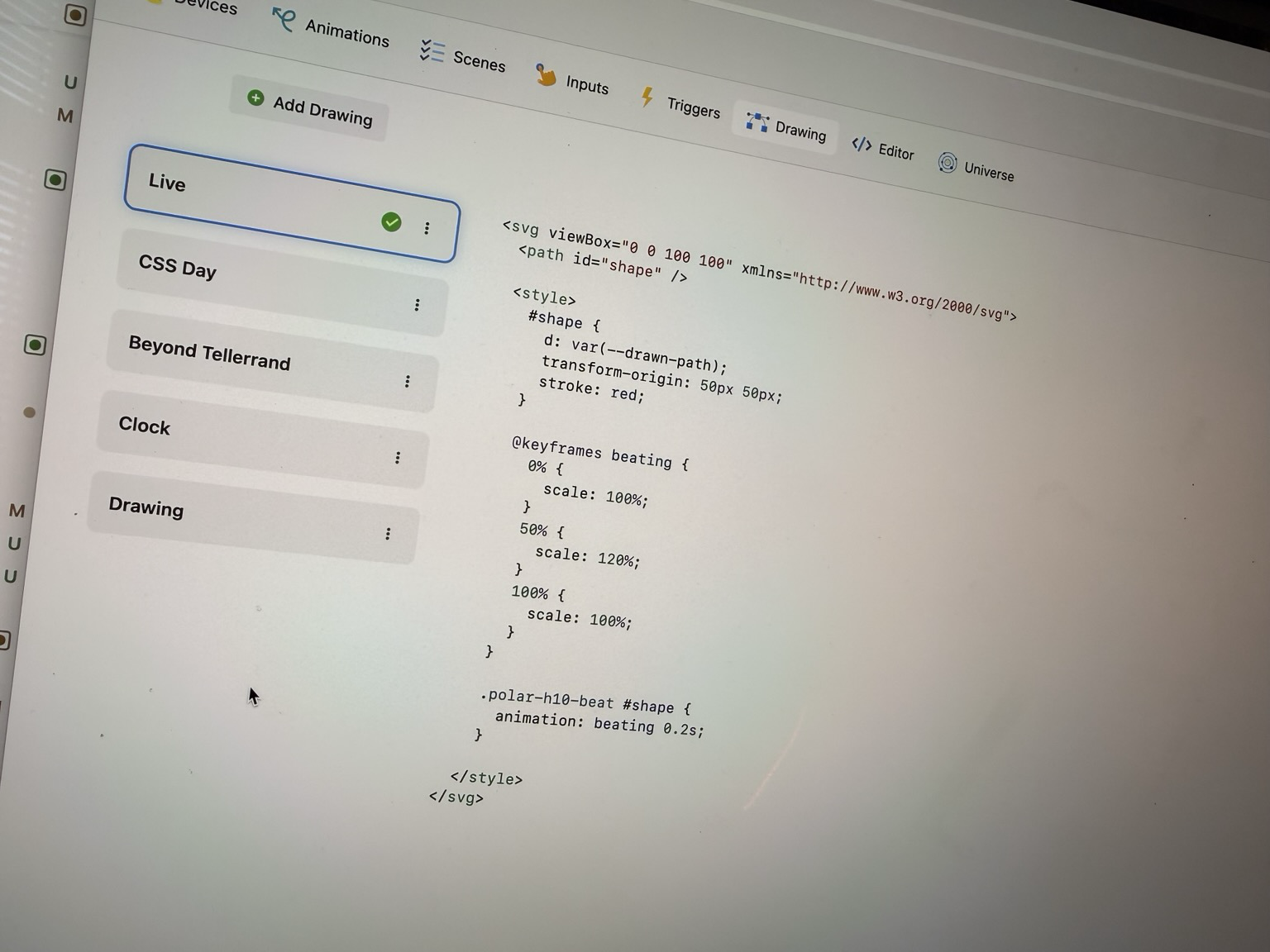
Don’t believe it? This is the actual code that gets rendered, sampled and send to the laser projector.

Don’t believe it? This is the actual code that gets rendered, sampled and send to the laser projector.

iA Valid
Text • iA Inc

Madness and Imagination

We all have plenty of reason to get mad about how messed up things are around us. But only a tiny few are mad enough to do something about it.

Bram.us Valid
Text • Bramus!

Introducing view-transitions-toolkit, a collection of utility functions to more easily work with View Transitions.

Over the past years, I’ve published a bunch of View Transitions contents: articles, talks, demos, etc. I’ve also done a bunch of more experimental things with them, such as optimizing the keyframes or driving a View Transition by scroll.

What I noticed while doing all those experiments is that I repeated a lot of the code … and they were scattered a bit all over the place as well. So I bundled that all up in a package: view-transitions-toolkit.

Original Content – Bram.us Valid
Text • Bramus!

Introducing view-transitions-toolkit, a collection of utility functions to more easily work with View Transitions.

Over the past years, I’ve published a bunch of View Transitions contents: articles, talks, demos, etc. I’ve also done a bunch of more experimental things with them, such as optimizing the keyframes or driving a View Transition by scroll.

What I noticed while doing all those experiments is that I repeated a lot of the code … and they were scattered a bit all over the place as well. So I bundled that all up in a package: view-transitions-toolkit.

Bramus Valid
Text

Over the past years, I’ve written a bunch of posts and done quite a few experiments with View Transitions, such as optimizing the keyframes (so that they animate on the compositor) or driving a VT by scroll.

I noticed I repeated a lot of code while creating all those … so I bundled that all up in a package for you to use as well.

Optimizing the keyframes or a VT for example now is just a one-liner: optimize(transition);

👉 https://chrome.dev/view-transitions-toolkit/

iA Valid
Text

Authorship lets you attribute parts of your text to different authors.
Clearly identify what you wrote and who else helped, including AI sources.
Try Authorship in Writer for Windows by joining the beta: https://ia.net/topics/who-wrote-this

https://www.youtube.com/watch?v=oZgfx0IsMok

Bram.us Valid
Video • Bramus!

CSS position: sticky now sticks to the nearest scroller on a per axis basis!

If you’ve ever tried to build a data table with a sticky header and a sticky first column, you know the pain. You’d think a simple position: sticky with top: 0 and left: 0 would be enough, but the reality was that only one of both would stick.

A recent change to CSS fixes this: position: sticky now plays nice with single-axis scrollers, allowing you to have sticky elements that track different scroll containers on different axes. This change is available in Chrome 148.

Original Content – Bram.us Valid
Video • Bramus!

CSS position: sticky now sticks to the nearest scroller on a per axis basis!

If you’ve ever tried to build a data table with a sticky header and a sticky first column, you know the pain. You’d think a simple position: sticky with top: 0 and left: 0 would be enough, but the reality was that only one of both would stick.

A recent change to CSS fixes this: position: sticky now plays nice with single-axis scrollers, allowing you to have sticky elements that track different scroll containers on different axes. This change is available in Chrome 148.

Bramus Valid
Text

If you’ve ever tried to build a data table with a sticky header and a sticky first column, you know the pain: the reality was that only one of both would stick.

A recent change to CSS fixes this: `position: sticky` now plays nice with _single-axis scrollers_.

https://www.bram.us/2026/03/30/css-sticky-per-axis/

Hello my name is Niels Leenheer Valid
Video • Niels

CSS is DOOMed

No, CSS is awesome. CSS is better than ever and it is only getting better. And that is why I built DOOM in CSS. Every wall, floor, barrel, and imp is a <div>, positioned in 3D space using CSS transforms. The game logic runs in JavaScript, but the rendering is entirely CSS. You can play […]

The post CSS is DOOMed appeared first on Hello my name is Niels Leenheer.

Bramus Valid
Text

“More” I say?

Yes, I did an experiment with making an extension to debug Anchor Positioning before:

https://front-end.social/@bramus/116213083230487150

There's a lot of complexity involved to make it work accurately … so that one ain't public (yet?).

Bramus Valid
Text

Some more prototyping fun: this time an extension to visualize the Containing Block of an element.

It shows the element and its containing block (an element, the Viewport, or the ICB) along with some base info.

Get it here: https://chromewebstore.google.com/detail/devtools-containing-block/cfhjohibdfclahlfljknkjmcdkfkcflj

What other info would you like to see in a feature like this?

(The heavy lifting to identify the containing block is done by the https://github.com/bramus/get-containing-block package which I also created for this)

Bramus Valid
Text

RE: https://front-end.social/@leaverou/116297807826814028

Before you blindly say 100px–200px–300px, hear me out: https://github.com/LeaVerou/blog/discussions/137#discussioncomment-16340589

(And if you really want it to be 100px–200px–300px then it’s simple: don’t type the --arg)

iA Valid
Text • iA Inc

Who wrote this?

Authorship comes to iA Writer for Windows

Bram.us Valid
Text • Bramus!

Cranking View Transtions up to 11 (2026.03.25 @ devs.gent)

Talk on View Transitions, given at the devs.gent March meetup

Bramus Valid
Text

RE: https://mastodon.scot/@svgeesus/116280100248182454

More details on the “parsing would be hard” part in https://www.bram.us/2026/03/19/more-easy-light-dark-mode-switching-light-dark-is-about-to-support-images/ ;)